2025 New Version • Safer & easier

WASender – Premium Message Sender

Export WhatsApp contacts, send personalized bulk campaigns with media, and manage templates – all from one simple, powerful Chrome extension.

  • ✔ No monthly fees – pay once, use it for life*
  • ✔ Keep full control: data stays in your own WhatsApp account
  • ✔ Secure PayPal checkout & dedicated support

*Subject to WhatsApp policies and fair-use limits. WASender is an independent tool and is not affiliated with WhatsApp or Meta.
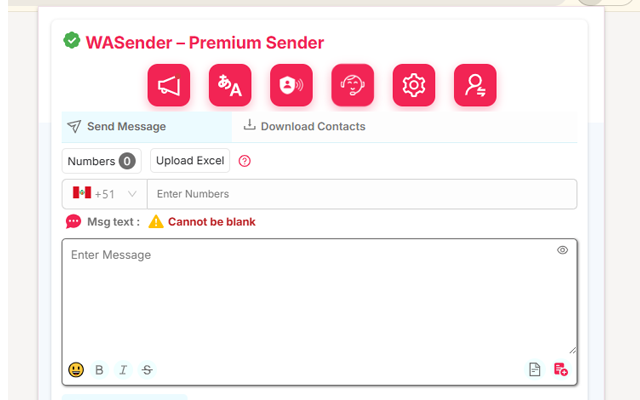
WASender UI
Real interface preview Optimized for Chrome on desktop

Why users trust WASender

Designed for entrepreneurs, agencies and small businesses that need a simple but serious tool to send messages at scale.

🛡️
Safe workflows
Delay & batch settings to reduce blocking risk.
💳
Secure payments
PayPal checkout for international buyers.
🤝
Human support
Direct chat for installation & first campaigns.
Powerful, yet simple to use

Everything you can do with WASender

Turn your WhatsApp into a smart communication hub: organize contacts, prepare campaigns, personalize every message and send at scale — with control and safety.

📤
Export contacts, groups & labels

Build clean, structured lists directly from your WhatsApp.

  • Export saved and unsaved numbers
  • Include groups, labels and archived chats
  • Download to Excel / CSV in one click
✉️
Bulk messages with variables

Make every message feel 1–to–1, even when sending to hundreds.

  • Use variables like {name}, {city}, {amount}
  • Map columns from Excel automatically
  • Save time and keep your tone consistent
📎
Attach media & documents

Add context and value to your campaigns in a professional way.

  • Send images, PDFs, audio and video
  • Include captions and call-to-action
  • Perfect for offers, invoices, tickets & more
⏱️
Smart delay scheduling

Protect your number with human-like sending behaviour.

  • Configure delay between each message
  • Send in blocks to avoid overload
  • Pause / resume campaigns safely
🔍
Filter active WhatsApp numbers

Stop wasting time and credits on numbers that don’t exist.

  • Detect which numbers have WhatsApp
  • Clean inactive or invalid contacts
  • Get more results with smaller lists
🌐
Multi-language & saved templates

Keep your best messages ready to reuse in any campaign.

  • Create templates for different use cases
  • Work in English, Spanish or Portuguese
  • Keep your team aligned with the same copy
3 simple steps to start

How WASender works

You don’t need to be a developer. If you can use WhatsApp Web and Excel, you can run professional campaigns with WASender.

✅ No coding required ⚡ Setup in a few minutes 🛡️ Runs locally in your browser
1
Install & connect
Get WASender ready in Chrome

Download the extension files, open chrome://extensions, enable Developer mode and click “Load unpacked”.

Then open WhatsApp Web, scan your QR code and WASender will connect securely to your existing account, reading chats locally in your browser.

2
Prepare your campaign
Data + template + strategy

Import contacts from Excel/CSV or select existing chats and groups directly from WhatsApp. Choose or create a template with variables like {name} or {amount}.

Configure sending delays, batch size and order. Decide who receives what, and how fast messages should be sent.

3
Send, monitor & improve
Control every message

Launch your campaign and watch the progress in real time. You can pause, resume or adjust your strategy as you go.

Export logs to see who received your messages, who failed, and which lists or templates are performing best — so each campaign is better than the last.

Choose your perfect plan

Simple, transparent pricing. Pay once and focus on growing your business – no hidden monthly fees.

Free

Try the basics

$0 / forever

Ideal if you just want to explore how WASender works.

  • Lifetime access to basic tools
  • Unlimited messages (manual use)
  • No filtering of numbers
  • No delay & batching automation
  • No media attachments in bulk
  • No sending/filter reports

Chat support (4:30 AM – 4:30 PM GMT)

Monthly

Most popular

$7 / month

Perfect for short campaigns, events or seasonal offers.

  • Valid for 1 month
  • Unlimited messages
  • Number filtering
  • Delay & batching controls
  • Send media attachments
  • Sending & filter reports

Chat support (4:30 AM – 4:30 PM GMT)

Quarterly

Best for agencies

$15 / quarter

For recurring campaigns and small teams that send every month.

  • Valid for 3 months
  • Unlimited messages
  • Number filtering
  • Delay & batching controls
  • Send media attachments
  • Sending & filter reports

Chat support (4:30 AM – 4:30 PM GMT)

Yearly

Best value

$45 / year

Ideal if WhatsApp is a core channel for your business.

  • Valid for 12 months
  • Unlimited messages
  • Number filtering
  • Delay & batching controls
  • Send media attachments
  • Sending & filter reports

Chat support (4:30 AM – 4:30 PM GMT)

All prices in USD. Payments are processed securely through PayPal.

Frequently Asked Questions

If you don’t find your answer here, feel free to reach our team – we’re happy to help you decide if WASender fits your use case.

WASender – Premium Message Sender is a Chrome extension that helps you organize and send WhatsApp messages in bulk. You can export contacts, customize messages with variables and media, and manage templates from a simple, friendly dashboard.

After purchasing, you receive the extension files. Open chrome://extensions, enable Developer mode, click “Load unpacked” and select the WASender folder. Then open WhatsApp Web and log in with your QR code to start using it.

Bulk sending, contact export, variables, media attachments (images, PDF, audio, video), filters to detect active WhatsApp numbers, configurable delays, reports, and multilingual templates, among others. Everything is controlled from your browser.

Yes. You can import numbers from Excel/CSV or select existing chats and groups. WASender sends each message one by one with delays you define, helping you respect WhatsApp’s policies and protect your account.

When building a template, you can add variables like {name}, {city} or {amount}. In your Excel sheet you simply match each column to a variable and WASender will replace them automatically for every contact.

Inside WASender you will find a reports area where you can review campaign status, logs and exported results. This helps you understand who received your messages and optimize future campaigns.

Yes. You can save multiple templates for different use cases (reminders, offers, confirmations, etc.) and reuse them whenever you need, keeping your communication fast and consistent.

Still have questions? Write us at soporte@wasender.es and we’ll be happy to assist you.

WhatsApp